
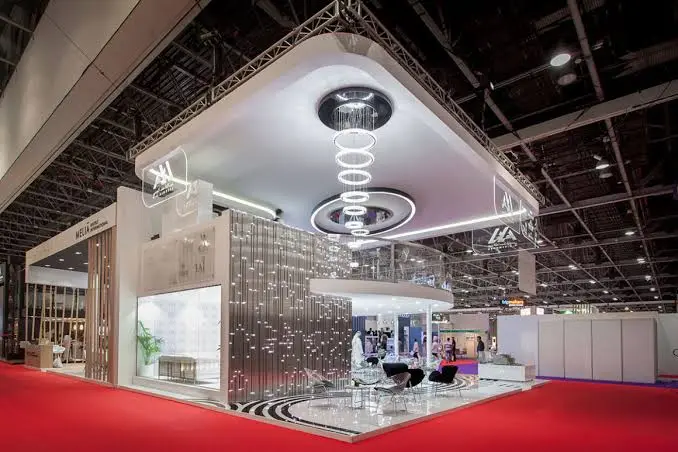
The environment at an exhibition hall is noisy, busy, and bright. There are hundreds of stands fighting for the same target audience, but most people will pass by your stand within seconds of seeing it. You only get seconds to communicate your message and explain why they should give your stand some time.
In this guide, you can learn about practical tips for designing an exhibition stand for your Dubai event. We will discuss how you can plan your design according to your goals, how to communicate your message right away, how to use technological elements right without dominating with them, how to collect leads, and what to do after the event is finished.
Start With One Clear Goal for Your Exhibition Stand
A majority of stands tend to do it all. Brand awareness, leads, demo, publicity; a stand has to fulfill all its objectives in a very tiny space. In most cases, such a stand fails at all these objectives. Select your goal and keep everything else as a secondary objective.
For instance, when your objective is generating leads, then your stand design should be able to initiate interaction and capture contacts. When the objective is product launch, then it should be able to feature the product and give visitors the opportunity to interact with it. Similarly, if brand awareness is the objective, then your design should have a visually striking element, which visitors will remember after the show.
Document your objectives and make sure every member of the team is aware of it. At every instance of dilemma in design decisions, simply pose this question to yourself – will this assist me in achieving my objective?
What Visitors Notice First at a Trade Show
Decision-making happens within the time it takes to walk by the stand. People see your display from the aisle, at an angle and often while talking or looking elsewhere. Therefore, your stand needs to be easily readable from afar.
Be brief. Your company name and one descriptive line are better than a lot of text on your stand. Place your message at eye level and make it visible enough to be read across the aisle. Passers-by are not going to bend down to read tiny print.
The motion and lights are good. Motion like a looping video will attract attention better than a simple poster. Good lighting of your product will make it more attractive compared to products on adjacent stands. But remember to keep it tidy. A messy stand indicates that there is too much to process.
Keep the Layout Open
An open stand invites people in. A table across the front acts like a wall, and visitors hesitate to cross it. Put your desk toward the back or the side, and leave the front open so people can step in and look around without feeling they must talk to someone.
Think about how people will move. Leave enough room for a small group to gather without blocking the aisle. A stand that causes a traffic jam outside it can annoy neighbours and the organiser.
Give People a Reason to Stop
A stand needs a reason to stop, not just a nice look. That could be a live demo, a short game, a quick photo, or a chance to try something hands on. People stop for things they can do or see happen, more than for things they can read.
Choose one hook and do it well. A stand with five different activities feels confusing. A stand with one strong draw feels focused, and visitors remember it.
Using Technology on Your Exhibition Stand
Technology can bring a stand to life, but only when it serves your goal. A screen that plays random content, or a device nobody understands, wastes space. Ask what each piece of technology does for the visitor and for your team before you add it.
Interactive Experiences That Draw a Crowd
Hands-on experiences pull people in because they get to take part. Visitors who try something stay longer, and a longer stay gives your team time to talk. Our AR and VR activities page and our VR and AR equipment page cover the options we offer for events.
If you use an experience like this, plan the queue. A popular activity creates a line, and a line can block the aisle. Decide how many people can take part at once, how long each turn lasts, and where waiting visitors will stand. Keep a staff member near the activity to explain it and to start a conversation with people waiting.
Photo and Video Booths
A booth gives visitors something to share. People who take a photo at your stand often post it, and that spreads your brand beyond the hall. It also creates a natural moment to talk while the photo is being taken. See our photo and video booth page for what is available.
Brand the experience so the photo shows your name. A photo that carries your logo or message does the marketing for you. Make sure the booth does not trap visitors in a long line, and keep it where your staff can see it.
Lead Capture at Exhibitions That Actually Works
Collecting leads is the main reason many companies exhibit, yet it is where many stands lose the most value. Paper cards pile up, handwriting is hard to read, and notes get lost on the way back to the office. A digital method fixes most of this.
Tablets for Scanning and Forms
A tablet on a stand, or in a staff member’s hand, can run a short form or scan a visitor’s badge. Data goes straight into your list, with no typing later. Staff can also add a quick note about what the visitor wanted, which helps the follow up. Browse our iPad rental page to see what we offer for lead capture.
Keep the form short. Name, company, email, and one question about their interest is often enough. Long forms slow the conversation and put people off. Test the form on the exact device before the show, and check that it works when the internet is slow.
Handling Visitor Data Properly
Leads are personal data. In the UAE, Federal Decree-Law No. 45 of 2021 sets rules for how personal data is handled, and free zones such as DIFC follow their own regime. Tell visitors how you will use their details, collect only what you need, and store the list safely. A legal adviser can confirm what applies to your company.
Demos and Presentations on Your Stand
A live demo is one of the strongest ways to hold attention. People like to see a product work. But a demo that stalls or crashes does more harm than no demo at all, so plan it with care.
Use a device that matches the software. A heavy design tool or a video demo needs a machine with real power, and a basic laptop will lag in front of visitors. Our laptop rental page lists business and gaming laptops, and our MacBook rental page covers Apple options. If your team works on a fixed screen at the stand, a desktop can suit that.
Rehearse the demo on the actual device, with the actual files, before the show. Keep a second device ready with the same demo loaded. If the first one fails, you switch in seconds, and visitors barely notice. Keep demos short, since people rarely stand for long on a busy floor.
Printed Materials and Badges
It helps to have some print in a digital stand too. Just make sure there is something in print form that can be taken home by your guests; not everyone favors the digital format. Just make it brief and include your contact information along with your call-to-action message.
If you do any printing of badges, name cards, or labels yourself then having an efficient printer on hand becomes necessary. Having one that fails to function during your busiest hour will add extra pressure on you. You can visit our printer rental page for further information. Always keep extra supplies for your stand.
Internet and Power at Dubai Exhibition Venues
Your gadgets will require electricity, and possibly, internet connection as well. In large-scale venues like Dubai World Trade Centre, the supplier is normally the one responsible for providing you with the connections available. Find out early what is included in your booth package and what needs to be ordered separately.
The internet is not always reliable. A roomful of visitors all with their mobile devices could affect the connection speed via WiFi. If your demonstration or lead generation strategy relies on the internet connection, then you should prepare for a contingency plan. See our WiFi Service for assistance in connecting your event to the internet.
Make sure you bring along extension cords and power strips and label your cables. You must ensure that there is a sufficient number of sockets for all your screens, tablets, and chargers. It is a common mistake, and an easy one to prevent.
Common Exhibition Stand Mistakes
Many stands fail for the same reasons. Some try to do too much and confuse visitors. Others hide behind a table, use tiny text, or run a demo that is not tested. Weak lead capture is another common problem, because paper cards and messy notes lose value quickly.
Another frequent mistake is poor planning around power and the internet. Teams arrive and find they have too few sockets or a weak connection. Staff training gets skipped too, which leaves people unsure what to say. Most of these are easy to fix with a short checklist and a rehearsal before the show.
Exhibition Technology Support from Dubai Event Rental
Dubai Event Rental rents iPads, laptops, MacBooks, desktops, iPhones, and printers for events across Dubai, and our team works from Dubai Investment Park 1. If you plan to run lead capture, demos, or badge printing at your stand, you can see what we offer on our rentals page. You can also learn more about our team on the About Us page.
For help with registration at larger events, see our event registration page. Send your show dates, venue, and device needs through our contact page and we will reply with a quote.
Frequently Asked Questions
Keep the message brief and legible from the aisle, keep the stand’s entrance unblocked, and provide one strong incentive to visit, like a demo or an activity. Having friendly and enthusiastic staff is another key to success.
There are many options to choose from depending on the aim. The tablet works well for capturing leads, the laptop for doing the demo, while interactive experience or the photo booth suits brand awareness best. Use the technology aimed at one specific goal rather than adding different devices just for fun.
Use the tablet with a brief form, or badge or QR code scanning. Leave some notes on what the visitor was interested in. This eliminates the need for paper cards and saves time.
No, but it would be helpful if you print badges, labels, or leaflets on site.
Yes. Inquire from the organiser about what your stand package includes, and arrange an alternative in case your demo or lead generation requires internet access. Crowded halls could slow down a shared connection.
It will depend on the size of your stand and how much traffic you expect. You should ensure that there are enough people on your stand during peak times and lunch and tea breaks, so that no one is left without a person to assist them. Brief everyone on the aim and the key message.
As soon as possible after the event. Arrange your follow up in advance, segment your leads according to interest level, and refer back to what was actually discussed.
The UAE law related to personal data collection is the Federal Decree-Law No. 45 of 2021, and there are also separate laws for free zones such as DIFC. You should collect only information that you require, inform visitors of how you intend to use it, and keep it safe. Consult